Teams Phone (via Imagicle)
| Who is this for? | Required permissions and licenses |
|---|---|
| • Administrators who manage company integrations and want to systematically record Teams Phone calls. | • Administrator rights on your Leexi and Teams accounts. • At least 5 licensed users to enable the integration. • Each Leexi user's email address must exactly match the corresponding Teams user's email address. • Additional costs may apply: they are included in your Leexi subscription (no separate Imagicle subscription is required). Contact your Leexi sales representative to enable the integration. |
How to use it
Contact your Leexi sales representative
Agree with your sales representative on the number of Teams recording licenses needed (additional costs may apply). Leexi then informs Imagicle that you should receive access to its product.
Request your Imagicle tenant
Complete the Imagicle Cloud Service form. The Imagicle team then creates your tenant (within 1 to 2 business days), which Leexi will have access to.
Complete the Imagicle onboarding
Follow the remaining steps of the Microsoft Teams full cloud native integration procedure (the MS-Teams Tenant Onboarding step corresponds to the tenant request above). The Main App ID and the Pair App ID are sent to you by Leexi via email. The choice of which calls to record (inbound/outbound, internal/external...) can be configured: contact Leexi to set this up.
Enable the integration in Leexi
Go to Settings → Integrations, find the Teams Phone integration, click Add then Save. Once activation succeeds, click Manage.
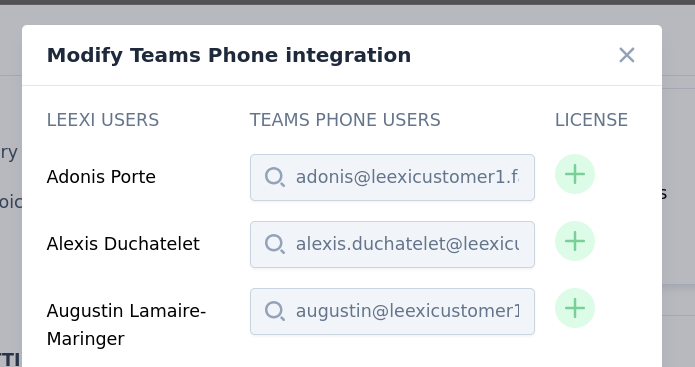
Assign licenses to users
For each user whose Teams Phone calls you want to record, add a license by clicking the + button. The number of licenses that can be assigned must be agreed with Leexi (billed by number of licenses): beyond that, an error is displayed. After an update, the change can take up to 4 hours to be taken into account by Imagicle.
Things to watch out for
- Assigning or changing licenses can take up to 4 hours to take effect on the Imagicle side; only then do calls start being recorded and imported.
- Leexi users' email addresses must exactly match Teams users' email addresses, otherwise calls are not attributed.
- Assigning more licenses than the number agreed with Leexi generates an error.