Notifications
Recording GDPR Email
Enable the email that notifies participants that a video conference meeting will be recorded.
| Who is this for? | Required permissions and licenses |
|---|---|
| • All users who want to automatically notify their contacts that a meeting will be recorded. | • A Leexi account is enough. • Each user enables the option from their own notifications. |
How to use it
Open your notifications
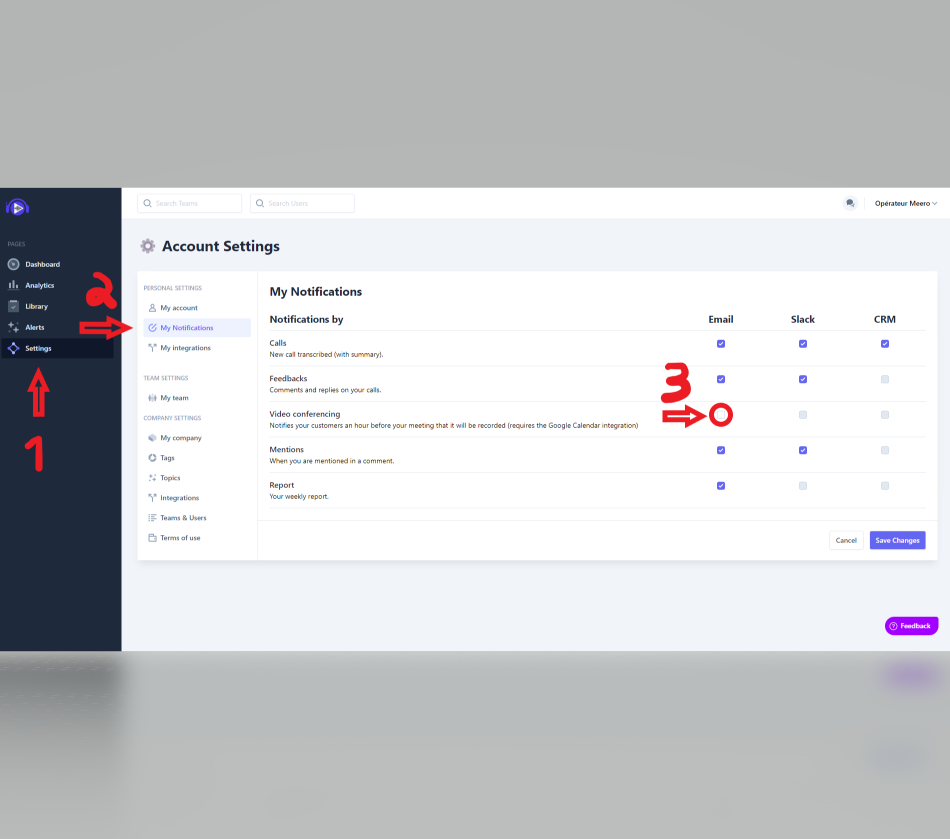
From your Leexi account, go to Settings, then to My notifications.
Enable the video conference notification
Check the Video conference box to enable sending the GDPR email requesting authorization to record.
Going further
Example of a standard email received by participants:
Hello,
I am an artificial intelligence assistant. This is a friendly reminder: you have a meeting with Matthieu Lombard from Leexi today at 15:00.
The meeting will be recorded for note-taking and training purposes. The system is 100% automated. Feel free to contact Matthieu Lombard for any further information.
Best regards, Leexi